
Skip to content
Mernyx
Open menu

Mermaid Kanban Diagram Cheat Sheet

Columns of cards, one column per stage of the work.

Every picture on this page was drawn byMernyx, the native Mermaid editor for macOS. Not by a browser running Mermaid.js — the same renderer the app uses for its canvas.

Columns

A column is an id and a title in brackets. The columns are the stages of the work.

kanban
  todo[Todo]
  doing[In progress]
  done[Done]

Three kanban columns side by side, headed Todo, In progress and Done.Expand diagram

Cards

A card is an id and a description in brackets, indented under the column it belongs to.

kanban
  todo[Todo]
    docs[Write the docs]
    fix[Fix the bug]
  doing[In progress]
    ship[Ship the release]
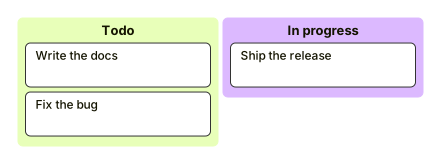
A Todo column holding two cards, Write the docs and Fix the bug, next to an In progress column holding Ship the release.Expand diagram

Card metadata

The braces after a card carry its extra facts: who has it, which ticket, how urgent.

kanban
  todo[Todo]
    id3[Update database function]@{ ticket: MC-2037, assigned: 'knsv', priority: 'High' }
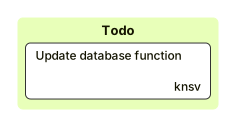
A Todo column with one card, Update database function, and a small marker beside it naming knsv as the assignee.Expand diagram

Draw it in Mernyx.

Open a .mmd file, move a node on the canvas, and the source comes with it. Native on macOS, no browser involved.

Diagram preview