Mermaid cheat sheet
The core of the Mermaid language, one rule at a time — the source beside the diagram it produces. all 34 diagram families, the syntax that actually gets used.
Every picture on this site was drawn by Mernyx, the native Mermaid editor for macOS. Not by a browser running Mermaid.js — the same renderer the app uses for its canvas.
The four things most diagrams use
Direction, arrows, node shapes and styling — shown here as flowchart syntax. Whatever you are drawing, these four come up first, and they are written the same way in most families.
The first line picks the flow: TD and TB are the same, LR and RL run sideways.
flowchart LR
A[Start] --> B[Middle] --> C[End]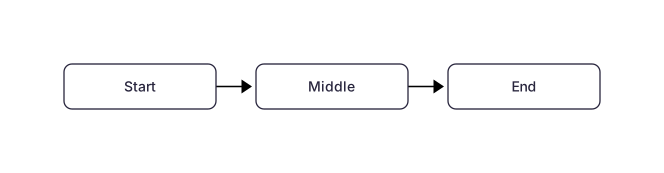 Expand diagram
Four ways to connect two nodes: solid, dotted, open and thick.
flowchart LR
A[Solid] --> B[Target]
A -.-> C[Dotted]
A --- D[Open]
A ==> E[Thick]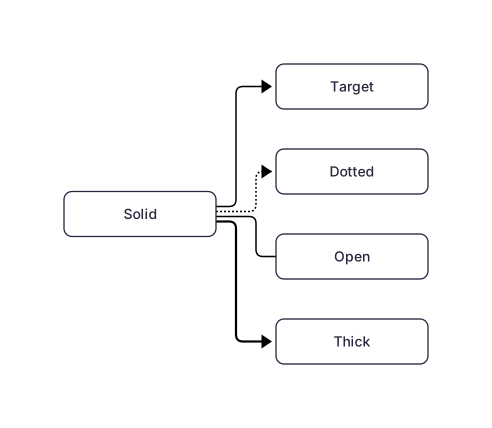 Expand diagram
The brackets you type are the shape you get. These are the five Mernyx draws as everyday boxes.
flowchart LR
A[Rectangle] --> B(Rounded)
B --> C([Stadium])
C --> D[[Subroutine]]
D --> E[(Database)] Expand diagram
style changes one node; classDef names a style you can reuse.
flowchart LR
A[Normal] --> B[Highlighted]
style B fill:#ee421d,color:#ffffff,stroke:#b32c0c
classDef quiet fill:#f0f0f3,stroke:#d4d4d8
class A quiet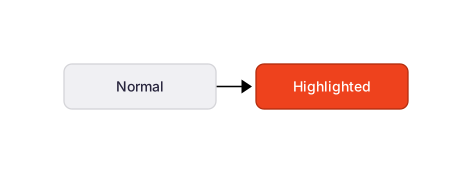 Expand diagram
The diagram families
Each family has its own page, its own syntax and its own rules.
34 families
- Flowchart11 rulesBoxes, arrows and branches — the diagram most people mean by Mermaid.Open the cheat sheet
- Sequence diagram8 rulesMessages between participants, in order, over time.Open the cheat sheet
- Class diagram6 rulesTypes, their members, and how they relate.Open the cheat sheet
- State diagram7 rulesStates, the moves between them, and the branching in between.Open the cheat sheet
- ER diagram4 rulesEntities, their columns, and the cardinalities between them.Open the cheat sheet
- Mindmap4 rulesA text outline that becomes a tree, with no arrows to write.Open the cheat sheet
- Architecture diagram4 rulesServices, the groups they live in, and the edges between them.Open the cheat sheet
- Requirement diagram4 rulesRequirements, their kinds, and what satisfies them.Open the cheat sheet
- Block diagram4 rulesA wall of blocks, read from left to right.Open the cheat sheet
- Swimlane diagram4 rulesA process split into lanes, one per owner.Open the cheat sheet
- Agent flow diagram4 rulesAn agent’s steps, and what kind of step each one is.Open the cheat sheet
- Use case diagram4 rulesActors, use cases, and the system that owns them.Open the cheat sheet
- Pie chart3 rulesA labelled list of values, drawn as slices.Open the cheat sheet
- Gantt chart4 rulesTasks, sections and dates, laid out along a time axis.Open the cheat sheet
- Quadrant chart4 rulesTwo axes, four quadrants, and the points plotted on them.Open the cheat sheet
- Radar chart4 rulesOne axis per measure, one curve per thing being compared.Open the cheat sheet
- Treemap3 rulesNested rectangles whose area is the value.Open the cheat sheet
- Kanban diagram3 rulesColumns of cards, one column per stage of the work.Open the cheat sheet
- Packet diagram2 rulesThe bits of a network packet, field by field.Open the cheat sheet
- Info diagram1 ruleMermaid’s version banner — Mernyx recognises it, but does not draw it yet.Open the cheat sheet
- Timeline3 rulesPeriods down one side, events beside them.Open the cheat sheet
- Sankey diagram3 rulesA flow, written as three fields per line.Open the cheat sheet
- User journey3 rulesA path with a score on every step.Open the cheat sheet
- Venn diagram3 rulesOverlapping sets, and the regions they share.Open the cheat sheet
- C4 diagram3 rulesThe architecture views, at three levels of zoom.Open the cheat sheet
- Cynefin diagram3 rulesFive domains, each with its own way of deciding.Open the cheat sheet
- Git graph4 rulesA branch history, drawn.Open the cheat sheet
- XY chart4 rulesA line or a bar chart on two axes.Open the cheat sheet
- Wardley map3 rulesWhere a component sits on visibility and on evolution.Open the cheat sheet
- Railroad diagram4 rulesA grammar rule, drawn.Open the cheat sheet
- ZenUML diagram2 rulesA sequence diagram, written for a method call.Open the cheat sheet
- Event modeling diagram4 rulesHow the information changed, in time.Open the cheat sheet
- Ishikawa diagram2 rulesOne problem, and the causes under it.Open the cheat sheet
- Tree view3 rulesA directory listing, drawn.Open the cheat sheet
No family matches that.
Mernyx renders 34 diagram families in total. This sheet covers all of them.
Questions
Is this the Mermaid documentation?
No. The official Mermaid docs are exhaustive — the flowchart page alone runs to hundreds of shapes. This is a condensed cheat sheet of the core syntax, the part you look up while writing a diagram. Where the official docs go deep, this page goes straight to the rule.
Why do the pictures look different from mermaid.live?
Because they are not drawn by Mermaid.js. Every diagram here is rendered by Mernyx’s own engine — the same native renderer the app uses for its canvas. Colours, spacing and typography are Mernyx’s, so what you see is what the app produces.
Can I paste these snippets into any Mermaid tool?
Yes. The source under each heading is plain Mermaid and works anywhere. The picture beside it is a rendering of that source by Mernyx — it is an illustration, not a special format.
Which diagram families are covered here?
This sheet covers all 34 diagram families Mernyx renders — one page each, linked from the list above.
Does Mernyx support every Mermaid feature?
Not yet, and the site will not pretend otherwise. Coverage keeps growing after 1.0, and the capability matrix lists what each of the 34 families can do — where a family cannot do something, the app does not offer that action at all rather than failing quietly.
Open one in Mernyx.
Take any snippet from this page, paste it into Mernyx, and move a node on the canvas. The source comes with it.