
Skip to content
Mernyx
Open menu

Mermaid Tree View Cheat Sheet

A directory listing, drawn.

Every picture on this page was drawn byMernyx, the native Mermaid editor for macOS. Not by a browser running Mermaid.js — the same renderer the app uses for its canvas.

Indentation

The indentation is the hierarchy, and a trailing slash marks a directory.

treeView-beta
    my-project/
        src/
            index.js
        package.json
        README.md
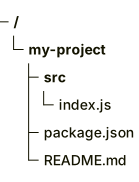
A tree of my-project, holding a src folder with index.js inside it, plus package.json and README.md.Expand diagram

Box drawing

The box-drawing characters work too, and the parser tells the two forms apart on its own.

treeView-beta
├── src/
│   ├── index.ts
│   └── utils.ts
├── package.json
└── README.md
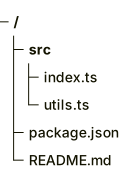
A file tree drawn with box-drawing characters: a src folder holding index.ts and utils.ts, plus package.json and README.md.Expand diagram

Annotations

After the name: three hashes marks it, icon() gives it an icon, and two hashes add a note.

treeView-beta
├── src/
│   ├── App.tsx :::highlight icon(logos:react) ## main component
│   └── index.ts ## entry point
├── package.json
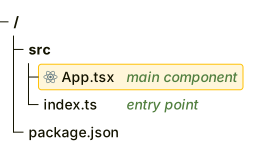
A file tree where App.tsx is marked as highlighted with a React icon and a comment reading main component.Expand diagram

Draw it in Mernyx.

Open a .mmd file, move a node on the canvas, and the source comes with it. Native on macOS, no browser involved.

Diagram preview