
Skip to content
Mernyx
Open menu

Mermaid ER Diagram Cheat Sheet

Entities, their columns, and the cardinalities between them.

Every picture on this page was drawn byMernyx, the native Mermaid editor for macOS. Not by a browser running Mermaid.js — the same renderer the app uses for its canvas.

Entities and attributes

Curly braces hold the columns. The type comes first, then the name.

erDiagram
  CUSTOMER {
    string name
    string email
  }
  ORDER {
    int orderNumber
    date placedAt
  }
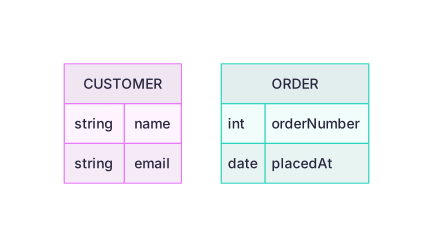
Two entity boxes, Customer and Order, each listing two attributes in a table.Expand diagram

Keys

PK, FK and UK mark the primary, foreign and unique keys.

erDiagram
  CUSTOMER {
    string custNumber PK
    string email UK
  }
  ORDER {
    int orderNumber PK
    string custNumber FK
  }
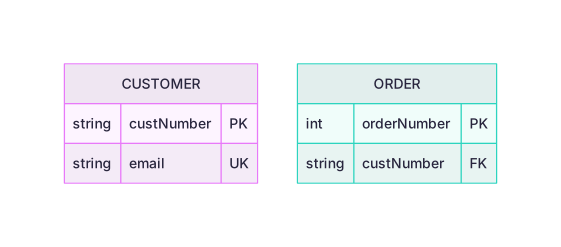
Two entity boxes whose attribute rows carry small key markers: PK, UK and FK.Expand diagram

Cardinality

The marks at each end say how many. A bar is one, a crow's foot is many.

erDiagram
  CUSTOMER ||--o{ ORDER : places
  ORDER ||--|{ LINE_ITEM : contains
  PRODUCT }o--o{ TAG : tagged
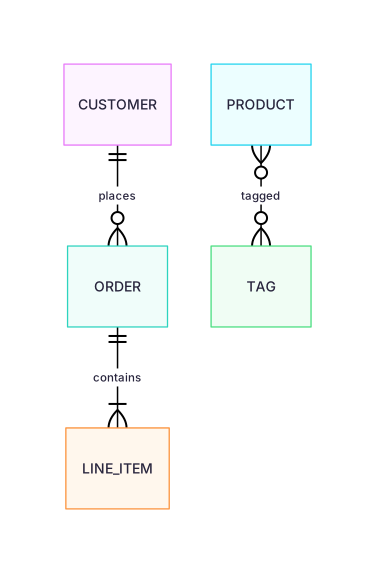
Three entity boxes joined by lines whose ends carry a bar on one side and a circle and a crow's foot on the other.Expand diagram

Labelling the relationship

The text after the colon is the verb between the two entities. More than one word needs quotes.

erDiagram
  CUSTOMER ||--o{ ORDER : "places an order"
  ORDER ||--|{ LINE_ITEM : contains
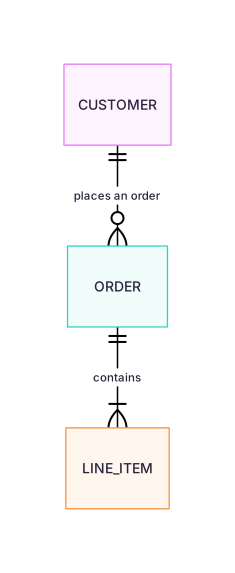
Two entity boxes joined by lines labelled places an order and contains.Expand diagram

Draw it in Mernyx.

Open a .mmd file, move a node on the canvas, and the source comes with it. Native on macOS, no browser involved.

Diagram preview