
Skip to content
Mernyx
Open menu

Mermaid Git Graph Cheat Sheet

A branch history, drawn.

Every picture on this page was drawn byMernyx, the native Mermaid editor for macOS. Not by a browser running Mermaid.js — the same renderer the app uses for its canvas.

Commits

Every commit is a line, and the commits land on the branch you are on.

gitGraph
    commit
    commit
    commit
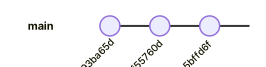
A git graph on the main branch with three commits in a row.Expand diagram

Branching

branch starts a branch, and checkout goes back to one you were on.

gitGraph
    commit
    branch develop
    commit
    checkout main
    commit
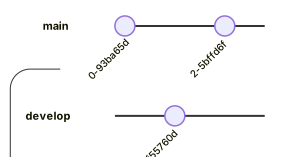
A git graph with a main branch of two commits and a develop branch splitting off after the first.Expand diagram

Merging

merge folds a branch back into the one you are on.

gitGraph
    commit
    branch feature
    commit
    checkout main
    merge feature
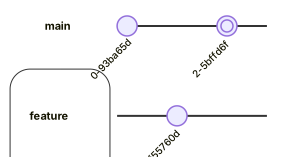
A git graph where a feature branch splits off main and is merged back into it.Expand diagram

Tagging a commit

The tag goes after the commit keyword, in quotes.

gitGraph
    commit tag: "v1.0"
    commit tag: "v1.1"
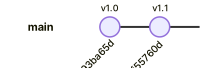
A git graph with two commits, the first tagged v1.0 and the second tagged v1.1.Expand diagram

Draw it in Mernyx.

Open a .mmd file, move a node on the canvas, and the source comes with it. Native on macOS, no browser involved.

Diagram preview